Engineering
Overview
On this page, we describe our work rules, work style, and guidelines for engineers.
- Audience: All technical positions in NABLAS: Researchers, Research Engineers, and Software Engineers.
- Contents: Workflows, Repository management, Commit-Push-PR, Linter and Tests
Workflows
Use GitHub Flow as your default workflow
In most cases, GitHub Flow is the gold standard workflow to follow.
For application development projects involving a release process to end users, it is recommended that you follow Gitlab Flow instead. In this case, add a production branch to your repository, in addition to the main branch, to synchronize release version of the application.
Optimize the workflow
Although GitHub Flow is the gold standard, it should be adapted and optimized based on your situation. The way we manage code depends on several factors such as the type and size of the project, and it's stage.
| Factor | Example |
|---|---|
| Type | Research / Internal Application / Application for end-users |
| Size | Solo / 2-3 members / more |
| Stage | Early / Pre-release / Production |
Basically, the repository should be more organized and structured as the project size increases. Conversely, for smaller projects or those in the early stages, flexibility can be prioritised. Optimise the workflow depending on these factors.
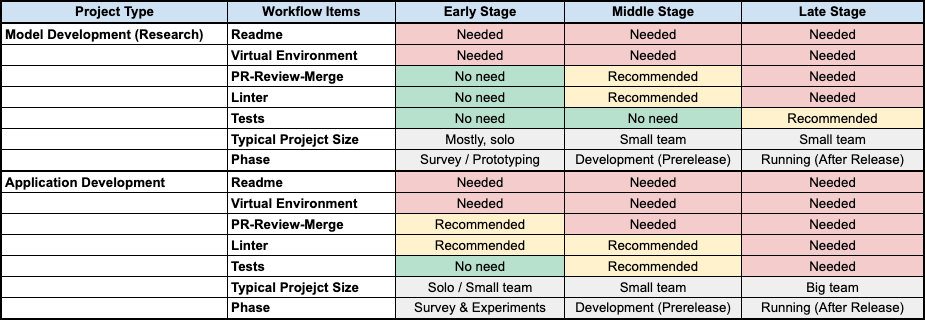
For example, adopting the full set of PR-review-merge workflow is too much for projects in the early stages. In that case, you can optimise (simplify) the workflow to prioritise the development speed.
If you are working on an application development project for end users, the stage of the project (before or after release) is a significant factor in workflow optimisation. You can prioritise the development speed during the pre-release stage, but once the system has been released, the workflow should be more solid and organized.
Repository management
Always work on a repository
The first thing you need to do when starting a project is to create or select a repository to work on. For the following reasons, it's quite important to work on a repository for both you and the team.
- Backup
- Github will be your backup
- It prevents suspension of operations caused by accidents, such as sudden sickness and hardware issues
- Sharing
- If team members can understand what you are doing, they can avoid duplicated work
- They can optimize their directions of work as well
- Access control and security
- Detailed access controls
- Users and groups
- Protection of Intellectual Property (Copyright)
- Can avoid unclear IP by company's repositories
- IP belongs to the company as a "work made for hire" (Article 15 of the Copyright Act)
The list of recommended actions and non-recommended actions are as follows;
- ✅ Do: Create (or select) a repository first, then, start developing on it.
- 🚫 Don't: Start developing first, share code afterwards.
- ✅ Do: Work on company's repositories.
- 🚫 Don't: Work on private repositories under private accounts.
Sandbox: Do not play on live systems
When working on development projects (web applications, research, etc.), we spend certain amount of time for investigation and experiments. If you want to try out new ideas, it's important to isolate experimental code from live systems. Imagine what would happen if you worked on a live systems. It causes problems such as;
- Messy codes or code stubs in the production environment
- Accidentally affecting to the production system
To avoid these issues, it's a best practice to have your own sandbox area where you can try out new ideas there before applying them to the production codes. When you have confirmed that they works, migrate them to the live systems by picking up the essential parts.
The sandbox area can take various forms. For example, it can be an isolated repository, just a directory in a repository, or an isolated Google Cloud project.
Minimise the number of repositories by using sandboxes
There is another reason why it's important to use sandbox areas. Imagine that you create a repository every time you start working on a new project. In that case, we are will need to maintain a huge number of repositories in the future. However, if you use existing sandbox areas, there is no need to create repositories every time. Instead of making a new repo, you can work on the sandbox area first and you can migrate the code when you think it's the time to create a repository.
The list of recommended actions and non-recommended actions are as follows;
- ✅ Do: Have an isolated place (sandbox) for experiments.
- 🚫 Don't: Experiments on the live system (already developed well).
- ✅ Do: Have your own sandbox repository, or create a sandbox directory on your repository.
- 🚫 Don't: Create new repositories every time you work on experiments.
If you do need to create a new repository for an experiment, remember to delete it once you have finished working on it.
Follow standard branch name conventions
There are a number of articles describing standard branch naming conventions. Read and follow them.
Ref: GitHub Branching Name Best Practices
feature/: For new features or functionalities.
hotfix/: For urgent patches, usually applied to production.
refactor/: For improving code structure without changing functionality.
bugfix/: For fixing bugs in the code.
...
Commit, Push and PR
Commit and push frequently
There are several benefits to commiting & pushing frequently.
- You can use GitHub to back up your code.
- You can roll back to previous code.
- You can receive feedbacks in real time rather than receiving a big direction changes after working for a long time.
- You and your team members can avoid duplicating work.
Reference: Gitlab Flow
Commit often and push frequently
...
Committing often also helps you share your work, which is important so that everyone is aware of what you are working on. You should push your feature branch frequently, even when it is not yet ready for review. By sharing your work in a feature branch or a merge request, you prevent your team members from duplicating work. Sharing your work before it’s complete also allows for discussion and feedback about the changes. This feedback can help improve the code before it gets to review.
Reference: Git Commit Best Practices
Backup: In case you work on a task for several days without pushing to the central repository, you risk loosing your work in case your PC goes down (assuming you have no other backup system in place).
The timing / frequency of commit & push;
Don't Commit Half-Done Work
Test Your Code Before You Commit
Make Small, Atomic Commits
In addition to the above, we recommend you to push at the end of the day you work on the project because the repository will be your backup. In this case, you don't need to hesitate to push your work even if it's still a work in progress. You can use "[WIP]" identifier on the beggining of the commit log.
Reproducibility
Make it Reproducible
In many ways, it's important to make your work reproducible; for other members (review process), for DevOps (delivery), and even for yourself. In other words, your work has no value if it's not possible to reproduce. The key components to make your work reproducible are; the source code, data and the environment.
Test (validate) before publishing PR
Reviewers will try to verify (test) your code by following the steps in Readme.md. If there are issues, additional communication will be needed, which wasts both your time and others's time. Make sure your code works properly before publishing PR.
Keep update Readme.md
Make sure that anyone, including yourself, can verify (test) your code by simply following the steps written in Readme.md. Describe the steps to reproduce your work in Usage section, in addition to Requirements section to describe the system requirements.
If some external data (from Internet, Google Drive or Hugging Face) is needed, include the concrete steps to prepare the data.
Simplify steps by scripts
If you the steps written in Readme are too long, create some scripts (such as Makefile, Justfile or shell script) to consolidate them into one simple executable command.
Always work on a Virtual Environment
uv (venv), Docker and Anaconda (or Miniconda) are the standard virtual environments widely used in NABLAS. If you are working on a Web application development project, Docker would be the primary choice. For a model development project, Anaconda or uv would be the choice. In any case, you should always work in a virtual environment to manage the packages for your work.
Package management
Use uv
uv is NABLAS's standard Python package manager. Unless you have a valid reason to use alternatives, stick with uv.
Pin dependencies
Pin dependencies in requirements.txt to exact, tested versions using == wherever possible.
Update dependencies for PR
Make sure that dependencies are updated before opening a PR.
Minimize dependencies
Include only the dependencies required by the module. Keep development-only dependencies separate from runtime dependencies.
Tests
TODO: Write me
Readable code
Read Readable code
Readable code is a book containing worth-to-follow best practices to improve the readability of code and make it more sustainable. Read it and try to pick the best practices which are suitable for you and your team.
Use Ruff
Ruff is NABLAS's standard Linter. Unless you have a valid reason to use alternatives, stick with Ruff. It automatically analyzes and formats your code following industry standards such as PEP8.
Make sure that your code is formatted by Ruff before opening a PR.